Customers overview
TL;DR - A "customer" is one of your end-clients (an organization or individual). Open Customers to see them all, filter by KYC / KYB status, and drill into any one of them to see their balance, virtual account, and transactions.
What a customer is
In Magma, every entity that holds a balance and sends or receives money is a customer (also called an organization in the API). Customers belong to your fintech; one fintech has many customers; one customer belongs to one fintech.
A customer can be:
- Business - a company. The wizard captures legal name, optional trade name, and country.
- Individual - a natural person. The wizard captures first name and last name.
Type is immutable after creation - pick carefully.
The customers page
The page shows every customer in your fintech, sorted by most recent first.
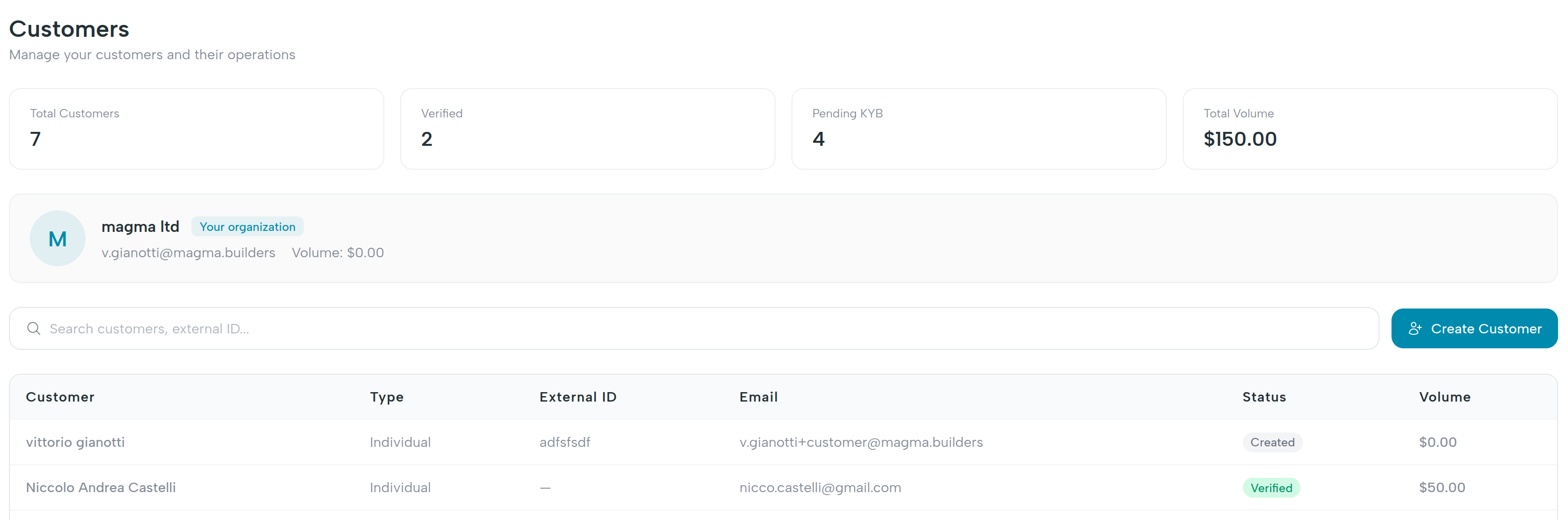
| Column | What you see |
|---|---|
| Name | Legal / trade name for businesses, or full name for individuals. |
| Type | business or individual. |
| Status | Onboarding state - see KYC / KYB status. |
| Balance | Current available balance on the customer's main virtual account. |
| Created | When the customer was added. |
KPI cards at the top of the page summarize:
- Total customers - count of all customers.
- Active customers - count where status is
active. - Total balance - sum of available balances across all customers.
- Pending KYC - count where the customer has not yet completed verification.
Filters and search
Use the filter row to narrow the list:
- Status - multi-select chips for
created,verifying,verified,active,rejected,review,suspended. - Type -
businessorindividual. - Search - free-text across name, email, and external ID.
Drilling in
Click any row to open the customer dashboard - a scoped view with the customer's balance, virtual account coordinates, and recent transactions.
What's next
- Create a customer - onboard a new organization.
- KYC / KYB status - understand the lifecycle from
createdtoactive.