Manage your team
TL;DR - From Platform Users, you can disable or re-enable an account. The original admin (created by Magma) cannot be disabled. Role changes and invite resends are not supported in v1 - pick the right role at invite time, and re-invite if a link expires.
The team list
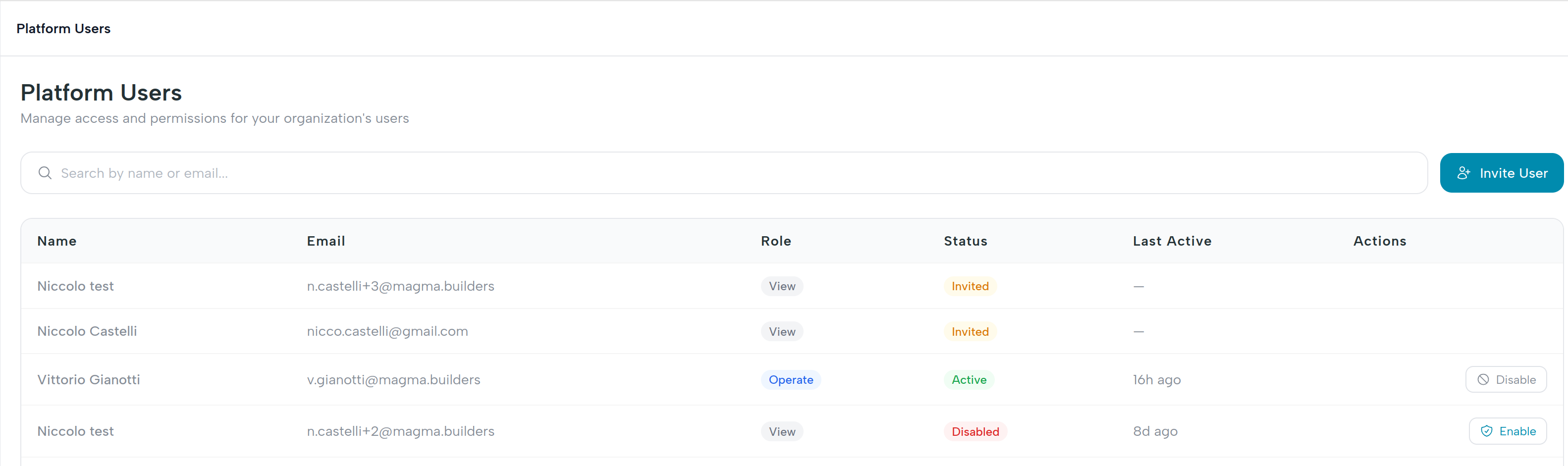
Each row in the team table shows:
| Column | What it means |
|---|---|
| Login identity. | |
| Name | Display name set during invitation. |
| Role | admin, operate, or view. |
| Status | invited (not yet accepted), active (logging in), or disabled (revoked). |
| Created | When the invite was sent. |
Roles are fixed after invite
In v1 you cannot change an operator's role after they've been invited. Pick the right role on the invite step - if you need to switch someone, disable their current account and re-invite them with the role you want.
Disable an operator
Disabling revokes login immediately. The operator can no longer obtain a valid token; any open sessions become unusable on their next request.
- Click the row's overflow menu (
⋯) → Disable. - Confirm in the modal.
The status flips to disabled. To restore access later, click Enable from the same menu.
Admin cannot be disabled
The original admin account (created by Magma during fintech onboarding) cannot be disabled. This guarantees you always have at least one path back into the dashboard. Promote a second person to admin first if you need to rotate the original.
If an invitation expired
There is no "resend invite" action in v1. If the invitee didn't click their link in time and the invitation expired, invite them again from Invite operators - same email is fine, a fresh single-use link will be generated.
When to use each role
- New hire who needs to send payments → Operate.
- Compliance / finance reviewer who should see everything but execute nothing → View.
- Someone who needs to invite or disable other operators → Admin (or operate, in v1 they're equivalent - but pick admin so you don't have to re-promote later).
What happens behind the scenes
| UI action | Endpoint |
|---|---|
| Disable / re-enable | PUT /api/v1/operators/{id} (status field) |
| List operators | GET /api/v1/operators |
See API reference for full request and response shapes.